Running 3+ Campuses From One Console: An Operational Guide to Multi-Campus School Management
If you run two or three campuses today, you already know why consolidation matters: we covered the coordination problems that appear at school number two in Managing 3 Schools Under One Trust. This article is the operational sequel: not why, but how. How the account structure should look, what consolidated reporting should actually contain, and how to govern multiple principals without becoming a bottleneck.
The goal is a specific working arrangement: every campus runs itself day to day, and the trust office sees the whole picture from one console without phoning anyone.
The Structure: One Organisation, Separate Schools
The foundation of multi-campus school management is a two-level hierarchy, and getting it right at setup saves months of pain later:
- Organisation (top level): the trust or society. This is where the subscription lives, where the trust administrator logs in, and where consolidated reports are generated.
- Schools (one per campus): each campus is its own unit with its own principals, teachers, accountants, students, parents, fee structures, timetables, and exam schedules.
Two rules make this structure work:
1. Every operational user belongs to exactly one school. A principal at Campus A cannot see Campus B's students, fees, or staff. This is not just tidiness: it prevents accidental cross-campus edits and keeps each principal fully accountable for their own data.
2. Only the organisation administrator sees across schools. The org-admin role is a different kind of login: it is a workspace over all campuses, not a super-principal inside one of them.
A common early mistake is running two campuses as "sections" inside one school account because it seems simpler. It breaks the moment you need per-campus fee reports, separate exam schedules, or campus-specific announcements. Structure each campus as a genuine school from day one.
What the Consolidated View Should Contain
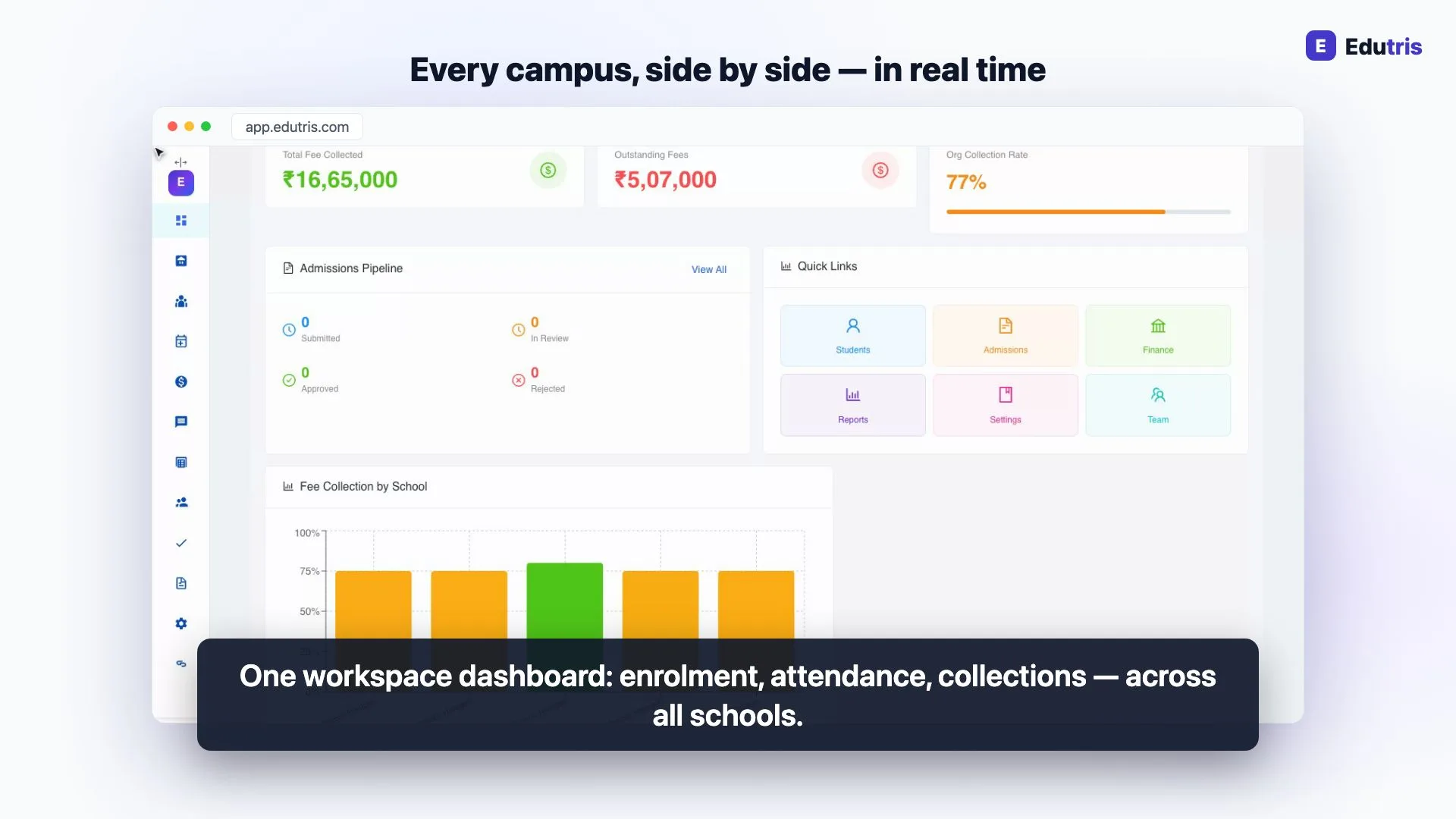
Once every campus records its work in the same system, the trust console can show organisation-wide numbers computed live from campus records. The views that earn their place on the trust administrator's screen:
| View | What it answers | Replaces |
|---|---|---|
| All-school totals | Students, teachers, and classes across the trust | Headcount emails at month end |
| Fee collected + collection rate | How much has come in vs. expected, per school and combined | Register photos on WhatsApp |
| Fee-by-school breakdown | Which campus is behind on collections | Manual Excel compilation |
| Admissions pipeline | Enquiries → under review → confirmed, per school | Calling each front office |
| Cross-school student and admissions lists | Finding any student or application in the trust | Asking three offices to search |
The important property is that these are the same numbers each campus sees locally, aggregated, not a separate reporting exercise. When the Campus B accountant collects a fee at 11 a.m., the trust's collection figure reflects it. There is no month-end reconciliation between "what the school reported" and "what actually happened", because they are the same record.
For trustee meetings, this changes the preparation from hours of compilation to minutes of review. The conversation shifts from assembling numbers to acting on them.
Per-School Independence: What Stays Local
Consolidation fails when it is confused with centralisation. These decisions should stay entirely with each campus:
- Fee structures and amounts. A campus in a district town and a campus in a city cannot charge identically. Keep fee heads comparable if you can, but let amounts differ.
- Timetables and exam schedules. Built and managed per school, by the people who know the staff and rooms.
- Attendance, marks, report cards. Teachers mark, enter, and publish within their own school.
- Day-to-day admissions decisions. The campus principal reviews and approves applications for their campus; the trust watches the pipeline, not each application.
- Local communication. Announcements to a campus's parents come from that campus.
The trust's job is to make these comparable, not identical. If every campus records fees, attendance, and admissions in the same system with the same categories, the trust gets comparability for free: without dictating how each principal runs their school.
Governance: Approvals and the Audit Trail
Visibility answers "what is happening". Governance answers "who decided, and was it proper". Two mechanisms cover most of what a multi-campus trust needs:
An approvals queue for organisation-level decisions. Some actions genuinely belong above the school, the kind of changes a trust board would want a second pair of eyes on. Routing these through an org-level approvals queue means campuses can initiate but the trust confirms, without the trust being involved in routine transactions.
A filterable audit log. For everything else, review beats pre-approval. An audit trail that records fee actions, grade publishing, admissions decisions, student record changes, and settings changes (filterable by school and action) lets the trust office answer "who changed this and when" in seconds. In practice, the existence of the log matters as much as its use: staff behave differently when actions are attributable.
Add to this a team page where the trust manages org-level users and each school's key logins, and you have the full governance loop: structure, visibility, approval where needed, and accountability after the fact.
A Realistic Rollout Sequence
Moving three running campuses onto one console is a project, not a switch-flip. A sequence that works:
- Set up the organisation and all schools first, even if only one goes live immediately. Naming, school codes, and admin logins done once, properly.
- Migrate one campus end to end, students (CSV import), fee structures, staff, timetable. Run it for two to four weeks until the front office is fluent.
- Bring the second and third campuses on using the first as the template. The second migration is always faster.
- Turn on the trust console last. Consolidated numbers are only trustworthy once every campus is recording its work in the system. A dashboard over partial data teaches the trust to distrust it.
Resist the temptation to run old registers "in parallel, just in case" for more than a month: parallel systems guarantee neither is complete.
How Edutris Handles This
Edutris is built on exactly this two-level model: an organisation with schools under it, verified tenant isolation between schools, and a dedicated org-admin workspace. The workspace shows all-school totals (students, teachers, classes, fee collected, collection rate, and the admissions pipeline) with a fee-by-school chart, plus cross-school student, admissions, and finance views, an approvals queue, and a filterable audit log. Each campus keeps its own principal, accountant, and teacher logins with full day-to-day independence.
Pricing is flat per tier rather than per student per campus: Starter at ₹2,999/month (up to 250 students), Professional at ₹7,999/month (up to 1,000), Growth at ₹14,999/month (up to 3,000), and custom Enterprise plans for larger groups. Edutris is a newer platform (currently proven in a multi-school pilot with an education society in Karnataka) and new trusts start with a 30-day guided pilot rather than being left to self-serve setup, which is usually the right way to de-risk a multi-campus migration anyway.
Written by the Edutris team, led by Manjunath Shedabal, Founder
Every product claim traces to verified capability; unshipped features live on the roadmap. Read our editorial policy.Free: The School Digitalisation Checklist
25 checkpoints across records, attendance, fees, communication, and compliance: score your school in 5 minutes and see exactly where time and fee revenue leak.
How Edutris gives school owners real-time control
Frequently Asked Questions
How should a trust structure multiple schools in one software system?
The proven structure is a two-level hierarchy: one organisation account at the top, with each school as a separate unit under it. Every principal, teacher, accountant, and parent belongs to exactly one school and sees only that school's data. The organisation administrator sits above all schools and sees consolidated numbers (enrolment, fee collection, admissions) without logging into each campus separately. This preserves each school's day-to-day independence while giving the trust a single point of oversight.
Can each campus keep its own fee structure and academic calendar?
Yes, and in most cases it should. Fee amounts legitimately differ between campuses because of location, facilities, and board affiliation, and calendars differ because of local holidays and exam schedules. What matters for the trust is that all campuses record fees and attendance in the same system, in the same format. Consolidation then happens at the reporting layer, the trust sees comparable numbers even when the underlying structures differ per school.
What should a trust administrator review weekly across campuses?
Three things cover most of what matters: fee collection against expected collection per school, the admissions pipeline per school (enquiries, applications under review, confirmed admissions), and enrolment headcount changes. A weekly 15-minute review of these three numbers per campus surfaces problems (a campus falling behind on collections, an admissions season going quiet) weeks before they would show up in a monthly meeting.
How do you keep oversight without micromanaging school principals?
Separate visibility from control. The trust administrator should be able to see everything (consolidated finance, admissions, audit trails) but day-to-day decisions like approving an admission or collecting a fee should stay with school staff. An approvals queue for genuinely organisation-level decisions, plus a filterable audit log for after-the-fact review, gives governance without inserting the trust into every transaction.
Read next
- 01For School Owners
Managing 3 Schools Under One Trust: What Changes Operationally
Running schools under one trust brings coordination problems single-school software can't handle, and how to manage it without adding headcount.
- 02For School Owners
The Admission Season Playbook: What the Office Needs Ready Before the First Application Arrives
An operational playbook for whoever actually runs admission season: the readiness list, a stage-by-stage calendar, and the front-desk capacity math.
- 03For School Owners
CBSE Affiliation, Explained for School Owners: Requirements, Process and the Records That Decide It
Affiliating to CBSE, or renewing? What the Affiliation Bye-Laws expect, how SARAS runs, the mandatory disclosures, and what inspections actually check.
- 04For School Owners
How to Design a School Fee Structure: Heads, Terms, Concessions and Due Dates
A practical guide to designing a school fee structure in India: choosing fee heads, class-wise amounts, collection frequency, concessions and due dates.
- 05For School Owners
How to Increase School Admissions: What Actually Moves the Number, and What Never Will
Most of what decides a school's intake is outside any software. Here is the narrow part you can move this season, and the part you cannot.
- 06For School Owners
NEP 2020 for School Owners and Principals: What Actually Changes in How You Run the School
What the policy says, quoted from the document, and what actually binds your school today. They are not the same thing, and the gap is the whole story.